
STM32 CMake工程模板创建指南
2025/12/3大约 2 分钟
先安装Cmake Tools和Cortex Debug和JLink
使用cubemx生成Cmake工程
配置编译器路径
打开VSC选择一个构建配置后如果配置失败说明编译器没有添加到环境路径中,这时候需要手动添加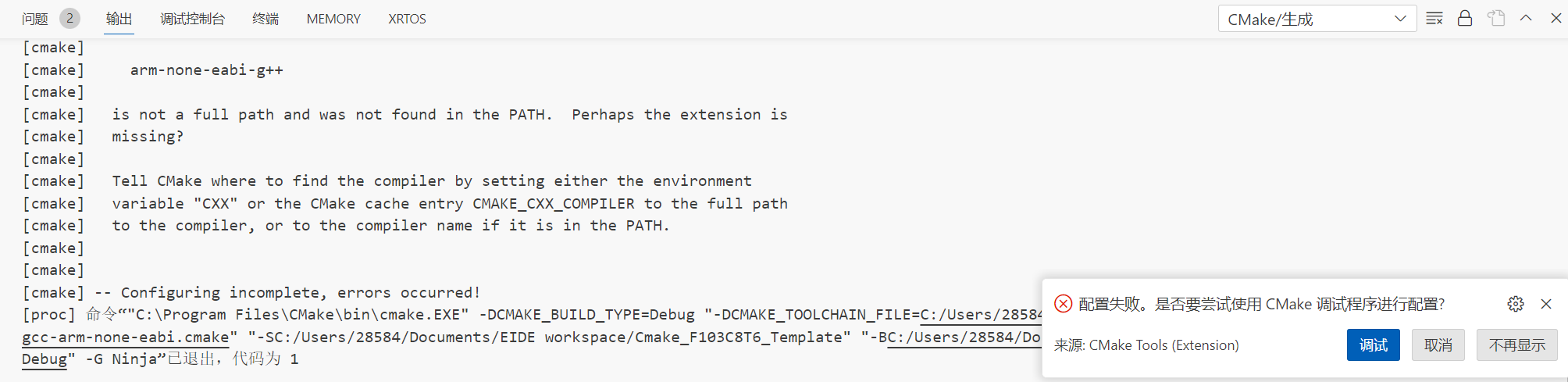
打开./gcc-arm-none-eabi.cmake对编译器路径进行设置,指定绝对路径
set(TOOLCHAIN_PREFIX                arm-none-eabi-)
set(TOOLCHAIN_DIR "C:/Users/28584/APP/arm-gnu-toolchain-14.2.rel1-mingw-w64-i686-arm-none-eabi/bin/")

set(CMAKE_C_COMPILER                ${TOOLCHAIN_DIR}${TOOLCHAIN_PREFIX}gcc.exe)
set(CMAKE_ASM_COMPILER              ${CMAKE_C_COMPILER})
set(CMAKE_CXX_COMPILER              ${TOOLCHAIN_DIR}${TOOLCHAIN_PREFIX}g++.exe)
set(CMAKE_LINKER                    ${TOOLCHAIN_DIR}${TOOLCHAIN_PREFIX}g++.exe)
set(CMAKE_OBJCOPY                   ${TOOLCHAIN_DIR}${TOOLCHAIN_PREFIX}objcopy)
set(CMAKE_SIZE                      ${TOOLCHAIN_DIR}${TOOLCHAIN_PREFIX}size)
这时候选择一个配置进行构建就可以构建成功。
烧录和调试
cortex debug在调试时会自动烧录,所以我也懒得再专门搞个shell脚本来烧录了,创建一个调试时不会自动暂停的配置就好了。同样使用Cmake进行自动生成。在根目录的CMakeLists.txt添加以下内容
# 创建自动配置的 launch.json

file(WRITE ${CMAKE_SOURCE_DIR}/.vscode/launch.json.in
[=[
{
    "version": "0.2.0",
    "configurations": [
        {
            "name": "Debug",
            "cwd": "${workspaceFolder}",
            "executable": "@PROGRAM_PATH@",
            "request": "launch",
            "type": "cortex-debug",
            "runToEntryPoint": "main",
            "servertype": "jlink",
            "device": "@device@",
            "liveWatch": {
                "enabled": true,
                "samplesPerSecond": 4
            },
            "swoConfig": {
                "enabled": true,
                "source": "probe",
                "swoFrequency": 2000000,
                "cpuFrequency": 48000000,
                "decoders": [
                    {
                        "port": 0,
                        "type": "console",
                        "label": "SWO output",
                        "encoding": "utf8"
                    }
                ]
            },
            "preLaunchTask": "build",
        },
        {
            "name": "Run",
            "cwd": "${workspaceFolder}",
            "executable": "@PROGRAM_PATH@",
            "request": "launch",
            "type": "cortex-debug",
            "runToEntryPoint": "",
            "servertype": "jlink",
            "device": "@device@",
            "liveWatch": {
                "enabled": true,
                "samplesPerSecond": 4
            },
            "swoConfig": {
                "enabled": true,
                "source": "probe",
                "swoFrequency": 2000000,
                "cpuFrequency": 48000000,
                "decoders": [
                    {
                        "port": 0,
                        "type": "console",
                        "label": "SWO output",
                        "encoding": "utf8"
                    }
                ]
            },
            "preLaunchTask": "build",
        }
    ]
}
]=])

# 替换占位符
set(PROGRAM_PATH ${CMAKE_BINARY_DIR}/${CMAKE_PROJECT_NAME}.elf)
set(device "STM32F103xb")

configure_file(
    ${CMAKE_SOURCE_DIR}/.vscode/launch.json.in
    ${CMAKE_SOURCE_DIR}/.vscode/launch.json
    @ONLY
)
在launch.json中设置了预处理任务为build,所以我们创建一个label为build的cmake生成任务
{
    // See https://go.microsoft.com/fwlink/?LinkId=733558
    // for the documentation about the tasks.json format
    "version": "2.0.0",
    "tasks": [
        {
            "type": "cmake",
            "label": "build",
            "command": "build",
            "targets": [
                "all"
            ],
            "preset": "${command:cmake.activeBuildPresetName}",
            "group": "build",
            "problemMatcher": [],
            "detail": "CMake 模板 生成 任务"
        }
    ]
}
添加颜色
正常情况的输出是纯色的,即使带了颜色信息。添加"Output Colorizer"扩展使输出带颜色